Wearable Heart Rate Basics
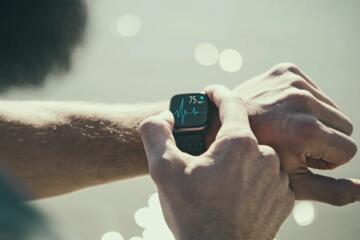
Wearable heart rate monitors estimate pulse by detecting tiny changes in blood volume under the skin. Most consumer devices use optical sensors that shine light into the skin and measure how much light is absorbed or reflected as blood flow changes. At rest, the signal is usually stable because you stay still and breathing patterns are regular. During exercise, motion, sweating, and changes in blood flow make the signal harder to separate from noise.
In practical terms, a watch reading at rest may track your pulse closely enough for trend monitoring, while the same device may show delayed, smoothed, or occasionally spiky values during running, cycling, or strength training. For example, a wearable may lag by several seconds during a sudden sprint, or it may underestimate peak heart rate when the sensor loses contact during arm swing or heavy sweating.
Accuracy also depends on the device’s algorithm. Two watches can show different numbers from the same person because they filter raw sensor data differently and decide how to handle motion artifacts. That means you should treat the wearable as a measurement system with limits, not as a direct pulse reading.
Why Rest Readings Mislead
People often assume that a stable number at rest equals high accuracy. Optical sensors can still misread at rest when the sensor is loose, the skin is dry, or the fit changes as you shift posture. Cold skin can reduce blood flow and alter the optical signal, which may cause the device to “hunt” for a stable reading.
Another common issue is that resting heart rate varies naturally. Sleep stage, stress, caffeine, hydration, and recent activity can change heart rate within minutes. If you compare a morning reading after poor sleep to an afternoon reading after a walk, the difference may reflect physiology rather than device error.
Biologically, resting heart rate is influenced by autonomic tone. When you sit quietly, the body reaches a steadier balance between sympathetic and parasympathetic activity. Optical sensors perform better when blood volume changes are smooth and predictable, which is why rest readings often look more consistent.
Possible consequences of over-trusting rest numbers include unnecessary worry about normal day-to-day variation or missing a meaningful change because you expect the device to be exact. For health monitoring, the safer approach is to look for patterns over time and to confirm unexpected changes with a manual pulse count or a clinical measurement.
Why Exercise Readings Drift
During exercise, the wearable must track rapid heart rate changes while the sensor experiences motion. Arm swing, wrist rotation, impact from running, and changes in grip during weights can shift the sensor’s position relative to the skin. Even a small gap between sensor and skin can reduce signal quality.
Sweat and skin temperature also matter. Sweat can change optical properties and increase light scattering, while heat can alter blood flow and the sensor’s baseline. If the device’s algorithm cannot separate the heart-rate signal from motion artifacts, it may smooth the data too aggressively, creating a delayed response to real increases in heart rate.
Exercise type changes the error pattern. Steady cycling often produces smoother readings than interval running because the wrist may move less and the sensor stays more stable. Strength training can cause intermittent dropouts when the wrist flexes repeatedly or when you tighten your grip and move the sensor off-axis.
Sudden intensity changes are a known challenge. When heart rate rises quickly, the wearable may lag because it needs a stable signal window to compute beats per minute. That lag can be clinically unimportant for general pacing, but it can matter if you use the number to hit a precise training zone.
How To Interpret Accuracy
Check Fit And Signal Quality
Start with the basics: wear the sensor snugly, not so tight that it causes discomfort or numbness. If the device supports it, position the sensor according to the manufacturer’s guidance and keep it aligned with the skin. In practice, you can test signal quality by watching for a stable heart-rate display during a 2–3 minute seated rest period. If the number jumps around or pauses, the issue is often fit, skin contact, or baseline sensor noise rather than your physiology.
For exercise, consider how your wrist moves. If your device is on a wrist that swings a lot during running, try tightening the band slightly and ensure the sensor stays flat. If you do workouts with heavy wrist motion, a chest strap or another measurement method can help you understand your wearable’s behavior, but the goal here is calibration of expectations rather than replacing medical evaluation.
Realistic outcome: at rest, many people see fewer abrupt changes when the fit is correct. During exercise, even with good fit, some lag and smoothing usually remain because motion artifacts are unavoidable.
Use Trends Over Single Numbers
Instead of focusing on one heart-rate value, interpret the direction and pattern. A wearable that consistently rises during warm-up and plateaus during steady effort is often more useful than one that matches a stopwatch-based pulse count at a single moment. For pacing, look at how quickly the reading responds and whether it tracks your perceived exertion across a session.
In practice, compare the wearable’s rest heart rate across days under similar conditions: similar sleep duration, similar caffeine timing, and similar hydration. If the device shows a consistent baseline shift over a week, that pattern may reflect real physiology even if the absolute number has some error.
Realistic outcome: the wearable’s absolute heart rate can differ from a reference method by several beats per minute, especially during high-intensity intervals. The trend across minutes is often more reliable than the peak value.
Validate With Manual Checks
You can do a simple validation at home without special equipment. After sitting quietly for 5 minutes, count your pulse at the wrist or neck for 30 seconds and multiply by two. Compare that number to the wearable reading at the same time. Repeat once more after another quiet period to see whether the wearable is consistently close or consistently biased.
During exercise, manual validation is harder because counting interrupts the activity. A practical compromise is to check immediately after stopping: start counting within 10–15 seconds of stopping and compare to the wearable’s heart-rate value at that moment. This test still has limitations because heart rate changes quickly after stopping, but it helps you estimate whether the wearable lags.
Realistic outcome: you may find that the wearable matches better at rest than immediately after stopping. That pattern aligns with the expected effect of motion and sensor stabilization time.
Know When To Seek Help
Wearables can support awareness, but they are not diagnostic tools. If you experience symptoms such as chest pain, fainting, severe shortness of breath, or sustained palpitations, seek medical evaluation rather than relying on device readings. A wearable can sometimes show abnormal patterns, but false alarms and missed events occur because sensor signals can fail.
For non-urgent concerns, consider discussing persistent or large changes in resting heart rate with a clinician. The key is to bring context: how long the change lasted, what conditions preceded it, and whether manual pulse checks agree with the wearable trend.
Realistic outcome: most day-to-day heart-rate changes reflect normal physiology, but persistent unexplained changes deserve professional review.
Rest Vs Exercise: Example Scenarios
Scenario 1: Steady Cycling
A person cycles at a steady effort for 30 minutes. The wearable shows a gradual rise during warm-up and then a stable plateau. Manual pulse counting after stopping suggests the wearable lags by a few beats per minute, but the overall pattern matches the expected response to steady workload. The person uses the wearable for pacing by watching the plateau range rather than chasing the exact peak number.
Scenario 2: Interval Running
A person runs intervals with frequent sprint-to-jog transitions. The wearable heart rate rises during sprints but appears smoothed and delayed, and peak values sometimes look lower than expected. The person notices that tightening the band and keeping the sensor aligned reduces dropouts, yet the lag remains. They switch to using perceived exertion and session averages for training decisions instead of relying on the displayed peak during each sprint.
Rest Vs Exercise Checklist
| Situation | What You’re Likely Seeing | Common Error Source | How To Use The Data |
|---|---|---|---|
| Quiet seated rest | More stable readings | Fit, cold skin, dry skin | Compare day-to-day trends; confirm with manual pulse if unexpected |
| Warm-up to steady effort | Gradual tracking | Algorithm smoothing window | Use ranges and averages over minutes |
| Intervals or sudden sprints | Lag and under/over-shoots | Motion artifacts, sensor contact shifts | Use perceived exertion; treat peaks as approximate |
| Strength training | Dropouts or jumpy values | Wrist flexion, grip pressure, off-axis sensor | Rely on session averages; check fit and sensor alignment |
Common Mistakes
- Comparing rest readings across different conditions. A morning reading after poor sleep or caffeine can differ from an evening reading without implying device error.
- Assuming peak heart rate is exact. Motion artifacts and smoothing during high intensity can distort peaks, especially during intervals.
- Wearing the sensor too loose. A slightly loose band may look fine at rest but can cause intermittent signal loss during movement.
- Ignoring sensor dropouts. If the display pauses or shows abrupt jumps, treat the value as unreliable rather than averaging it with clean segments.
- Using the wearable as the only safety signal. Symptoms such as faintness or chest discomfort require medical assessment regardless of what the device shows.
FAQ
How accurate are wearables at rest?
At rest, optical wrist sensors often track heart rate more consistently because motion is minimal. Accuracy varies by device and fit, so the best expectation is trend reliability rather than exact agreement with a reference pulse count.
Why does my heart rate lag during exercise?
Lag usually comes from the time needed for the sensor algorithm to stabilize the optical signal and from motion artifacts that temporarily degrade the measurement during intensity changes.
Do sweat and cold skin change readings?
Sweat can alter skin optical properties and increase light scattering, while cold skin can reduce blood flow and change the baseline signal. Both can worsen signal quality and increase variability.
Is a chest strap more accurate than a wrist sensor?
Chest straps often produce cleaner signals during movement because they measure electrical activity or better-stabilized signals, but performance depends on the specific device and fit. A practical approach is to compare your wearable against a reference method for your own workouts.
When should I stop trusting wearable heart rate?
Stop treating the number as reliable when the device shows frequent dropouts, large abrupt jumps without a plausible physiological reason, or persistent mismatch with manual pulse checks during quiet rest.
Author's Insight
Wearable heart rate accuracy differs between rest and exercise mainly because optical sensors must separate a heart-rate signal from motion and changing skin conditions. Rest conditions reduce motion artifacts, so the algorithm can compute beats per minute from a steadier signal. Exercise introduces wrist movement, sweat, and rapid physiological changes, which often produce lag, smoothing, or occasional errors in peak values. The most practical interpretation strategy is to validate fit, compare trends over time, and treat single peaks during hard intervals as approximate.
Key Takeaways
- Rest readings are usually steadier, but fit and skin conditions still affect accuracy.
- Exercise readings often lag or smooth because motion degrades the optical signal.
- Use trends and session averages for decisions; treat peaks during intervals as approximate.
- Do simple manual pulse checks at rest to understand your device’s typical bias.
- Seek medical evaluation for concerning symptoms rather than relying on wearable numbers.